Yesstea: A Stylish Script Font for Web Design
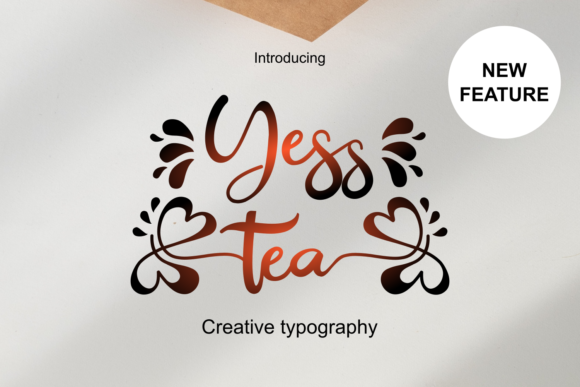
When I was redesigning a boutique online store, I knew the font had to do more than just look good—it needed to feel right. Yesstea was one of the first fonts I tried in the hero section. Its flowing curves and elegant strokes immediately caught my eye, adding a touch of sophistication that matched the brand's aesthetic.
Yesstea is a script font with a refined personality. It feels modern yet timeless, making it perfect for digital projects that want to stand out without being too flashy. The font includes stylish alternates and ligatures, which give it a unique character that can elevate any design. Whether it's used for headings or decorative elements, Yesstea brings a sense of class and polish to the layout.
Using Yesstea in Website Headers and Hero Sections
One of the first places I tested Yesstea was in the header of the online store. I paired it with a simple sans serif font for the body copy, creating a clear visual hierarchy. The contrast between the two fonts made the text easy to read while still maintaining an artistic flair. On desktop, the font looked great, but I wanted to make sure it worked well on mobile screens too.
On smaller devices, I noticed that the font's thin strokes could be a bit hard to read if not properly spaced. I adjusted the line height and letter spacing slightly, which helped improve readability without sacrificing the font's elegance. For mobile layouts, I kept the font limited to short phrases and headlines, ensuring it didn't overwhelm the user experience.
Yesstea in Call-to-Action Areas and Banners
I also experimented with using Yesstea in call-to-action buttons and banners. The font's fluidity made it ideal for short, impactful messages like "Shop Now" or "Join Our Community." However, I found that using it for longer text—like button labels or captions—could reduce legibility, especially on dark backgrounds or image overlays.
To maintain clarity, I used Yesstea primarily for decorative accents rather than primary text. For example, I added it to a banner graphic that featured a product image and a brief tagline. The font complemented the image without competing with it, creating a cohesive visual flow that felt natural and inviting.
Readability and Visual Hierarchy Considerations
As a web designer, I always consider how a font affects scanning behavior and brand trust. Yesstea, while beautiful, isn't the best choice for long paragraphs of text. It works best as a display font, used sparingly to highlight key information or add a personal touch to the design.
For body copy, I opted for a clean, readable sans serif font instead. This allowed me to keep the site accessible while still using Yesstea to reinforce the brand's identity. The font's presence in headers and logos helped build a consistent visual language that users recognized and associated with the brand.
Pairing Yesstea with Other Fonts
Font pairing is an essential part of web design, and Yesstea pairs well with both serif and sans serif fonts. I found that when paired with a simple serif font, it created a more editorial feel, while pairing it with a modern sans serif gave the design a balanced, contemporary look.
For the online store, I used a bold sans serif for product titles and a lighter version of the same font for descriptions. This allowed me to use Yesstea for the main heading and logo, while keeping the rest of the content easy to scan and digest.
Practical Tips for Using Yesstea in Web Projects
If you're considering using Yesstea in your next project, there are a few things to keep in mind. First, check the font's file formats and licensing to ensure it's suitable for your needs. PUA encoding makes it easier to access all the alternates and ligatures, which can be useful for customizing the font to fit your design.
Also, think about the context in which you'll use the font. Is it for a logo, a headline, or a decorative element? Understanding its strengths will help you use it more effectively. For example, Yesstea works well as a logo font, but may not be ideal for large blocks of text.
Finally, test the font across different devices and screen sizes. Make sure it looks good on both light and dark backgrounds, and adjust spacing as needed to maintain readability. With careful consideration, Yesstea can become a powerful tool in your design toolkit.
Yesstea for Digital Branding and Creative Projects
Whether you're building a portfolio site, a coaching website, or a product landing page, Yesstea offers a way to express creativity without sacrificing professionalism. Its versatility makes it suitable for a wide range of digital projects, from social media graphics to campaign landing pages.
For a recent blog redesign, I used Yesstea in the header and featured post titles. The font added a personal, handcrafted feel that aligned with the blog's tone. It also helped differentiate the site from others, giving it a more unique and memorable identity.
Overall, Yesstea is a great choice for designers looking to add a touch of elegance to their work. Its refined style and stylish alternates make it a standout option for web design projects that require a balance of beauty and functionality.